Quick, Safe & Easy Payment Methods with JazzCash and EasyPaisa
To play real-money tables in Y71, you add funds via JazzCash or EasyPaisa. If you haven’t yet, download the app first. This page explains how to deposit step by step so your balance is ready in minutes.
The same channels (JazzCash, EasyPaisa) are used for withdrawals. After you’ve earned through gameplay, you can withdraw from Y71 using our dedicated withdrawal guide.
First, open the Y71 app on your Android device. Your internet connection must be stable to open the app. Log in to your account by entering your registered phone number and password. Enter your login details correctly to log in successfully.
After logging in, your dashboard will appear, where you can see many options and different games. Click on the shop button to start the depositing process.
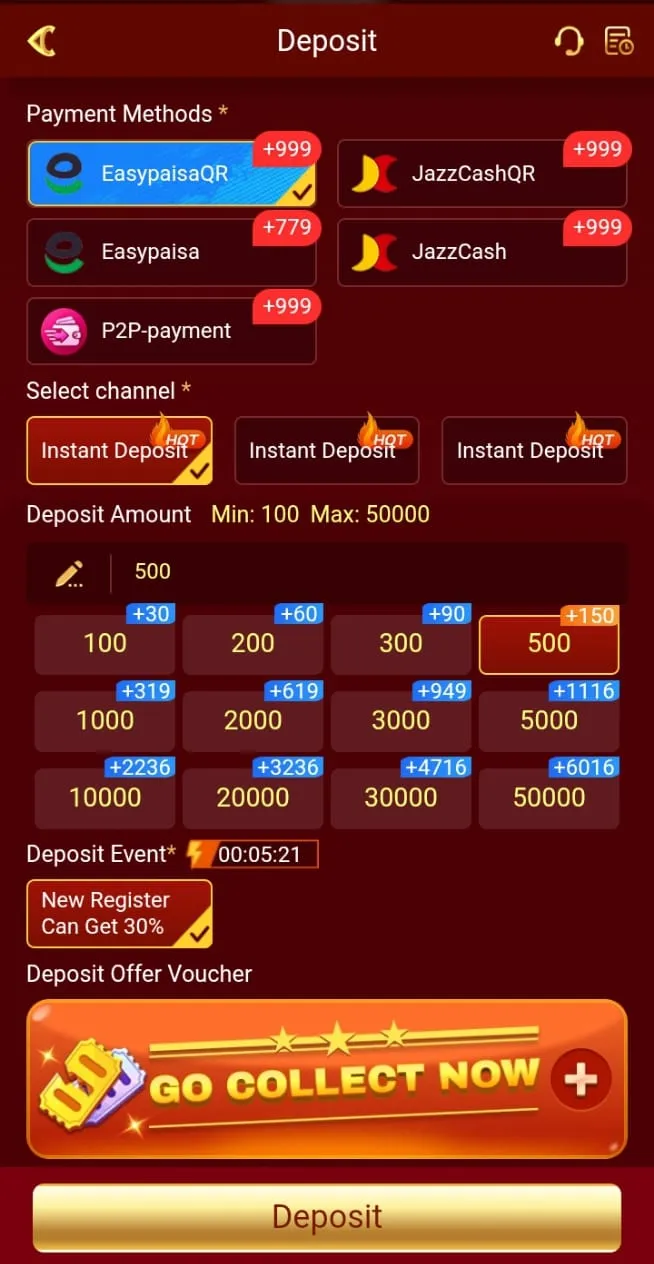
After clicking the shop button, a deposit page opens, showing payment methods and options. Choose a payment method, like JazzCash or Easy Paisa, that you can use easily.
After selecting the payment method, choose the amount you can afford to lose. There are many options like Rs 200, Rs 500, Rs 1000, or Rs 2000.
After entering the deposit details, click the Add Chips option. You will be redirected to the payment page, where you need to enter the account number that you want to use for payment. Click on the submit button to confirm the deposit.
After clicking on the submit button, you will receive a payment request on your selected account. Log in to your account and approve the payment request that you have received from Y71.
After approving the payment request, a deposit will be added to your Y71 account instantly. Sometimes it can take longer due to payment delays or network issues. When you receive payment, you can use it to play games without any hurdles.
The live Deposit screen often lists EasyPaisa QR, JazzCash QR, EasyPaisa, JazzCash and P2P channels. Typical limits start near Min Rs 100 with a maximum around Rs 50,000–100,000 per order — always trust the numbers shown in your session.
New-register first-deposit offers are often advertised at up to 30%. The effective percent can drop on larger amounts, so read the reward table before you pay.
Adding funds to Y71 is a fast and easy method if you follow all the steps correctly. You are required to open the app, tap the shop button, enter the correct payment details, and approve payment requests to deposit money into your Y71 account.
You must use secure and real payment methods to deposit money safely and enjoy games instantly. New users can easily add funds to their accounts and play games by following the proper steps.
You can add money to your Y71 account by opening the app, selecting the shop option, choosing a payment method and amount, confirming the deposit, and approving the payment request.
Yes, it is safe to add funds to Y71, as it uses a modern security system to protect your personal data and funds.
Y71 provides two payment methods, including Easypaisa and Jazzcash, that are secure and authentic.
